"Timeline" feature
I’d like to propose a feature called “Timeline.” It would provide a historical view of key events in chronological order for our customers. Right now, it’s difficult to quickly access important moments from conversations with clients, and it often takes a lot of time to find specific points in the chat history.
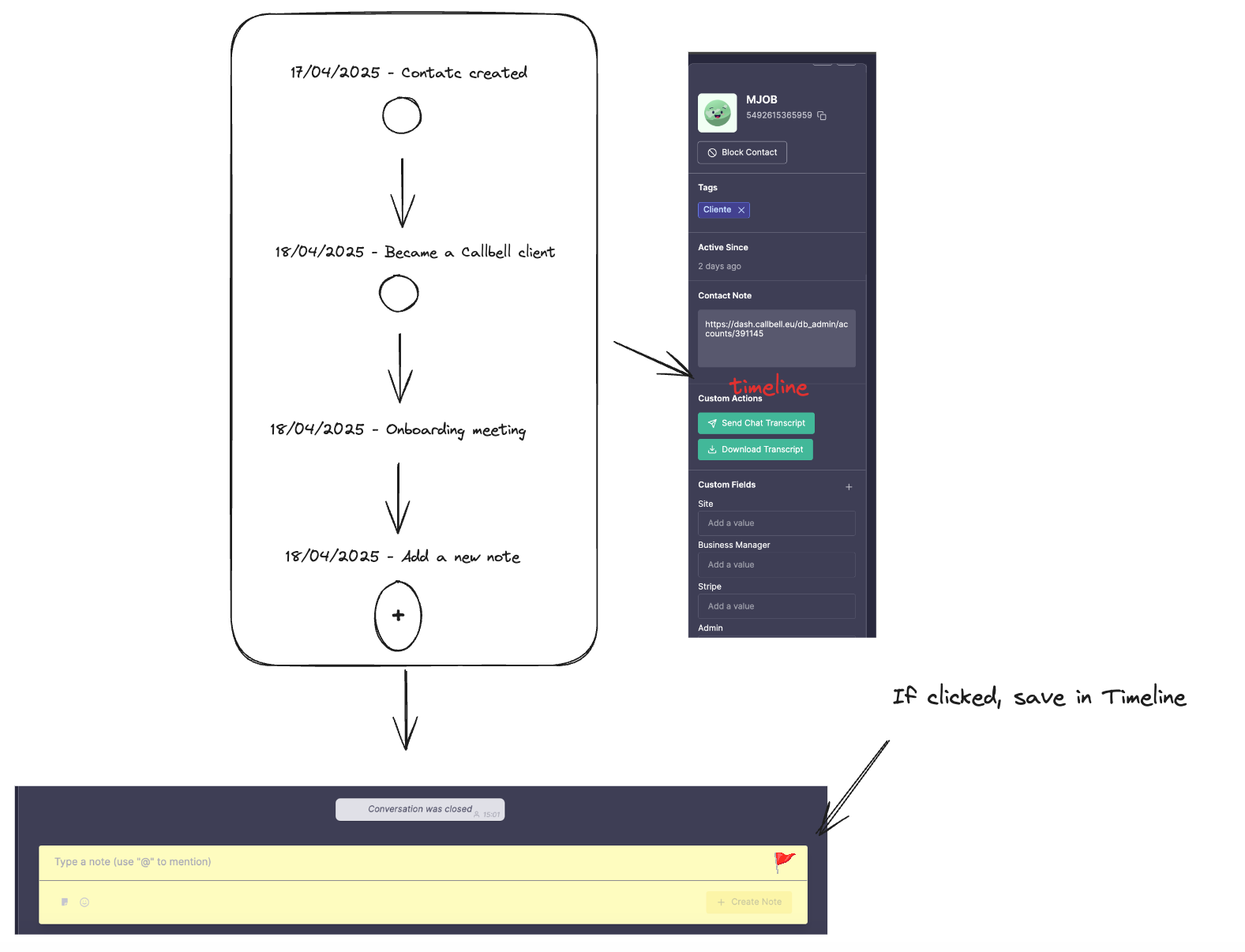
The idea is to add a small module on the right side when you click on Contact Information. This module would summarize key events, starting from the contact creation date, and allow you to add internal notes to the Timeline. When we create an internal note about a customer, there would be a checkbox to save that note as an event in the Timeline. This way, when you open the contact info, you can easily jump to specific moments in the conversation history.
The goal is to make it easier for us (and our clients) to find important events that happened over time. In the future, we could also explore adding triggers in the bot to automatically update the Timeline when a customer goes through a specific flow or for example to add a “sales” event with the amount bought by the client, or even created “type of events”, but for now, it could be a simple CRM feature to help manage customer history better, which we currently lack.
The basic idea is to have a vertical line in the contact info with key events saved in the Timeline, and a button at the bottom to easily add a new internal note with the flag to save it in the Timeline pre-selected. This could also be a nice extra feature for the Plus plan… I see it as simple, but effective, and beneficial for both us and our clients.
Log in to comment and vote
No comments yet
Be the first to share your thoughts.